
Heat Extremes
Data Limitations
Arkansas generally has good quality long-term data records for temperature values, however, the consistency of cumulative years on record vary by station. The majority of stations consist of a large record dating back up to the 19th century, however, some station locations include gaps in records that could be subject to technical issues or changes in monitoring location.
Definition and Description
A heat wave is an occurrence of unusual hot weather (maximum, minimum, and daily average) over a region persisting at least two consecutive days during the hot period of the year based on local climatological conditions, with thermal conditions recorded above given thresholds (WMO 2016).
Note: There is no universally recognized metric for what constitutes a heat extreme. The World Meteorological Organization recommends characterizing a heat wave by its magnitude, duration, severity, and extent. Magnitude is defined as a thermal measurement such as maximum temperature, or combination of several measurements, exceeding certain threshold(s). These values must be determined by the local climatology. Other studies have used thresholds based on human physiological response to heat, such as consecutive days of maximum or minimum temperatures above a threshold.
Heat extremes in the central United States occur when a dominant large-scale high-pressure system prevents the movement of other air masses into a region. The high-pressure contributes to intense heating from solar radiation, due to a lack of cloud cover, and light winds preventing the dispersion of heat, especially from urban areas. This results in both higher than average maximum and minimum temperatures.
Historical Data
Temperature Trends Dashboard
(1970-2023)Southern Climate Impacts Planning ProgramThis tool shows temperature trends at individual stations across Arkansas, including trends in extremely hot days, warm nights, seasonal extreme and average high/low temperatures, and cooling degree days, since 1970.
1. At the top of the tool, click the Extreme Heat, Warm Nights, Heating and Cooling Degree Days, Seasonal Averages, or Seasonal Extremes tab. 2. The default station is in Abilene, TX. To choose a station nearest to you, use the map on the right. Zoom in and click any of the blue dots to change stations. You can also select a station under the Station drop-down menu on the left of the page. 3. Use the graph to determine the trend (if any) for your selection. Solid lines represent significant trends. 4. Mouse over individual data points to view more information. 5. For seasonal selections, make sure you select a season in the Season drop-down menu on the left of the screen.

County-Level Minimum Temperature Explorer
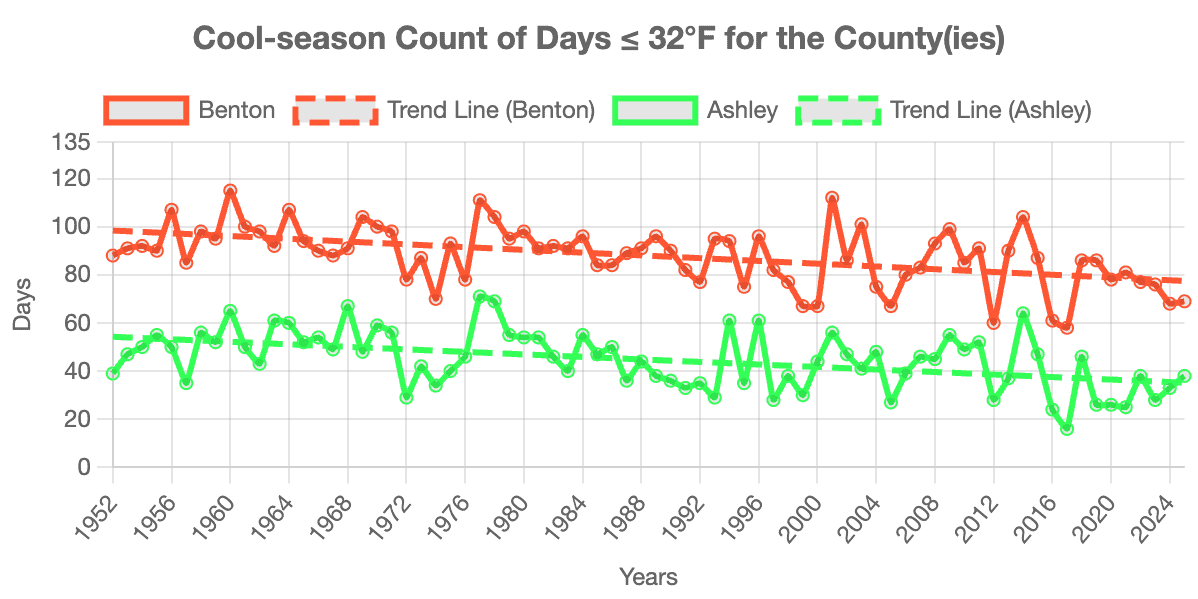
(1951-present)Southern Climate Impacts Planning ProgramThis tool displays several variables related to minimum temperature and their trend for up to five counties at a time. For extreme heat, options include warmest minimum temperature and minimum temperature at a user-defined threshold, which show nighttime warming and human health implications.
1. Click the state of Arkansas on the map. 2. Click up to five counties of interest. You may select counties across multiple states by clicking on another state. Deselect a county by clicking on it again. 3. Click the Tool tab on the top right. 4. Click Warmest Minimum Temp to populate the graph below. You may also choose your own threshold by selecting Minimum Temp Threshold and filling in the options below. 5. Yearly data and a trend line will be displayed for each county you selected. Hover your mouse over the points on the graph to display the yearly value. 6. Download the graph image or data by clicking the buttons below the graph. 7. Reset the graph and explore other counties by clicking Clear Plot below. 8. Click the Documentation tab at the top right of the page to read additional information about the tool.
Climate Extremes Tool - Temperature
(Period of record varies by station; up to ~140 years)Southern Regional Climate CenterThis interactive tool shows temperature records at point locations. Below are two ways the tool can be used to analyze heat extremes. If a station does not exist for your community, consider a nearby station.
(a) High temperature records by month: 1. On left side of screen (from top to bottom) select Records For A Month → High Max Temperature → Month of Interest → Submit. 2. Mouse over icons for record details including station name, date of occurrence, and station period of record.
(b) All-time records: 1. Select All-Time Records → High Max Temperature → Submit. 2. Mouse over icons for record details including station name, date of occurrence, and station period of record. Note: For more information, select the Help or About tabs.

Heat Index Days and Hours
(1973-2023) Midwestern Regional Climate CenterThis set of maps depict the average number of days, day with 3 or more hours, and average number of hours per year with heat index values at or above a variety of thresholds (e.g., 95°F, 110°F, 105°F).
1. Near the top of the page, click on the map link of interest out of the three options: Average Number of Days, Days with 3 or More Hours, or Average Number of Hours. 2. Right above the map, mouse over the heat index value of interest to view the corresponding data on the map. 3. To interpret the colors, see the legend on the top-right side of the map.

Average Annual Cooling Degree Days
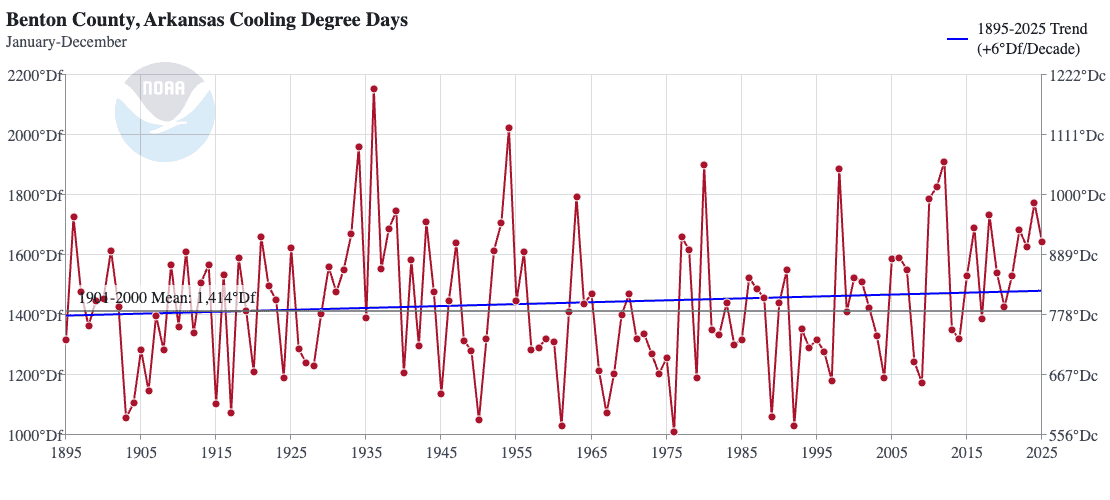
(1895-present) NOAA National Centers for Environmental InformationThis graph shows the average annual cooling degree days (CDD), a measurement used to quantify the demand for energy needed to cool buildings.
1. Within the State drop-down menu, choose Arkansas. 2. Within County, choose your county of interest. You can also view state-level values by selecting the State drop-down menu at the top of the page, and then clicking State Time Series. 3. Within Parameter, choose Cooling Degree Days. 4. Within Time Scale, choose 12-Month. 5. Within Month, select December to view the annual average for January-December. 6. Within Start Year, choose desired start year. 7. Within End Year, choose desired end year. 8. There are additional options on the right. Check Display Base Period to view a selected baseline for comparison. The default is 1901 to 2000, but you can choose other years, such as 1991 to 2020 to show the most recent 30-year period. Check Display Trend and leave the default years to view the long-term trend and decadal change. You may change this time frame for other trends of interest. 9. Click the Plot button. 10. Information in a table with annual ranking and anomaly is below the plot.
Historical Climate Trends Tool
(1895-present) Southern Climate Impacts Planning ProgramThis interactive graphing tool shows annual, seasonal, and monthly temperature trends by state and climate division. It can be used to gain a general understanding of temperature trends and show previous periods of higher temperatures, as well as years of extreme temperature.
1. On left side of screen select Arkansas → Climate Division of Interest → Season of Interest → Temperature. 2. For more information on how to interpret the chart, click on Chart Info. 3. Note that the graphs can be viewed by season, month, or annually.

Climate Change Trends
Fewer extremely hot days (100°F or greater) were observed in Arkansas in the 2nd half of the 20th century than during the 1st half (Runkle et al. 2017). The statewide temperature experienced a cooling period from the 1960s to 1980s, although it was followed by a warming period starting in 2010 with annual temperatures reaching levels comparable to the warmest period on record, the 1930s. Additionally, further warming is projected during the 21st century. By mid-century, models project 40 to 50 more days per year above 90°F (Vose et al. 2017) and about 30 more days per year above 95°F (Kunkel et a. 2013). Arkansas is also projected to experience an additional 20-30 nights per year exceeding temperatures equivalent to the top 7 warmest annual nighttime temperatures (nighttime temperatures staying above 67- 75°F, dependent on location within the state) (Shafer et al. 2014). Read more about future heat extremes in Climate Change Science and Projection Resources.
Climate Explorer – Climate Maps and Graphs Tools
(1950-2099) NOAA Climate Program Office and National Environmental Modeling and Analysis CenterThe Climate Explorer is an interactive tool that allows you to view and compare the average number of warm nights, extremely hot days, and cooling degree days per year for the historical period and in the future under both higher and lower emissions scenarios.
1. Type in the city or county you are interested in. 2. Click Climate Maps. 3. From the drop-down menu, select Days w/ max temp > 90°F (or other option up to 105°F), Days w/ min temp > 80°F (or 90°F), or Cooling Degree Days 4. Next to the drop-down menu, select Map. 5. Use the middle slider on the map to compare averages between historical, lower, and higher emissions scenarios. (Use the bottom drop-down menus to choose variables and the slider on the bottom right to choose a decade to compare with.) On the map, zoom in to the county level and click a county to view the associated values. 6. To view this information over time (1950-2099) for a single location, click the Graph tab at the top of the map and type a location at the top.

Temperature Projections - Heatwaves
(2036-2099) South Central Climate Adaptation Science CenterThis webpage includes several temperature projections, including the projected number of heatwaves per year, for the south-central U.S. during the mid-century (2036-2065) and end-ofcentury (2070-2099) time frames under low and high emissions scenarios.
1. The projections are grouped by mid-century and end-of-century. Scroll down to Projected Change of the Annual Average Number of Heatwaves for the time frame you’re interested in. 2. The maps in the middle of the page show the projections under a low emissions scenario on the left and high emissions scenario on the right. The average value in the top right of each map represents the average for the entire region, so use the legend below the map to estimate the value for your area. Note: Click the map to view a larger version. 3. On either side of the page is a text summary of the projections for both emissions scenarios. Note: You can use these maps to view the range of projected values, as the future value will likely fall somewhere in between the low and high emissions scenarios.
